Intro
If You Work Outdoors, You NEED This Tool. I mean it. A handheld weather meter is the small, tough device that tells you wind, temperature, humidity, heat index, and dew point in under 60 seconds. No guessing. No eyeballing the sky. If You Work Outdoors, You NEED This Tool because it protects crew safety, job quality, and your schedule. In this guide, I’ll show what it measures, how to use it fast, and where it saves you money. You’ll get simple steps, real job examples, and tips you can use today.
Quick Answer
If You Work Outdoors, You NEED This Tool because a handheld weather meter gives hard data for wind, heat, humidity, and dew point on site. You can check conditions in 1 minute, make a safe call, and document it. This reduces rework, protects crews, and keeps margins steady.
Table of Contents
Key Takeaways
- A 60-second reading can prevent a full day of rework.
- Watch wind at 10–20 mph, and dew point within 5°F of surface temp.
- Log readings at start, mid-day, and critical steps (3–5 times daily).
- Train crews in 10 minutes; set clear pass/fail thresholds.
- Document readings with photos and short notes to protect profit.
On most jobs, weather calls are guesses. That guess costs you. A wrong call on wind can shut down lifts. A bad call on dew point can ruin paint or coatings. Heat stress sneaks up fast.
If You Work Outdoors, You NEED This Tool because it gives numbers you can trust. You’ll know if wind is 8 mph or 18 mph. That difference decides if you spray, lift, or tarp. You’ll see if surface temp is 5°F above dew point. That simple check prevents blushing and peeling.
Data also helps with clients. When you show readings, the conversation changes. It’s not opinion. It’s proof.
What A Weather Meter Measures
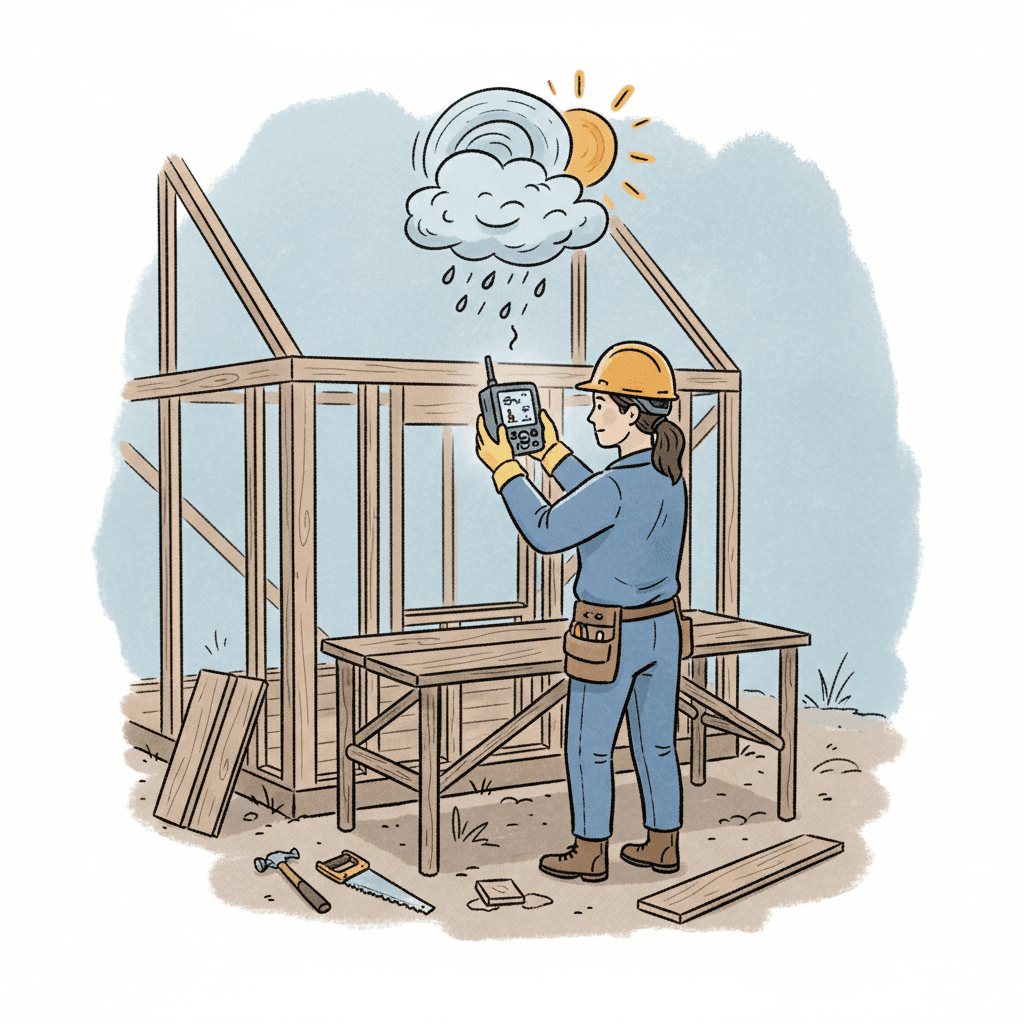
A good handheld weather meter fits in one hand and reads fast.
- Wind speed: instant gusts and average, useful from 0 to 40+ mph.
- Air temperature: often -10°F to 120°F ranges, jobsite ready.
- Relative humidity: common range 10% to 90%.
- Dew point: auto-calculated from temp and humidity.
- Heat index and often WBGT: helps with heat stress plans.
- Some models add barometric pressure and altitude.
If You Work Outdoors, You NEED This Tool because these numbers drive real decisions. They decide when to pour, spray, torch, lift, or cover.
How To Use A Weather Meter On Site
Here’s a simple, repeatable routine. It takes 3–5 minutes total.
- Warm up the sensor: Let the meter sit in ambient air for 30–60 seconds.
- Face the wind: Hold the impeller to the wind at chest height for 10–15 seconds.
- Note the gusts: Watch the peak and average wind readings. Write both.
- Check humidity and temp: Let it stabilize for 10–20 seconds.
- Confirm dew point delta: Make sure surface temp is at least 5°F above dew point before painting or coating.
- Record it: Take a phone photo of the screen. Add job, time, and location.
- Repeat: Log readings at the start, before critical steps, mid-day, and if weather shifts.
If You Work Outdoors, You NEED This Tool. Use it like any other safety check. Quick, consistent, and written down.
Trade-By-Trade Scenarios And Numbers
Roofing and Waterproofing
- Torch-down or adhesives: Wind above 15–20 mph can create unsafe flame control and poor adhesion.
- Membranes: Gusts at 18+ mph risk wrinkles and blow-offs. Stage sandbags early.
- Action: If wind is near 15 mph, switch tasks or increase ballast and crew count.
Painting and Coatings
- Dew point rule: Keep surface temp at least 5°F above dew point.
- Spraying: Above 10–12 mph, overspray risk climbs fast. At 15+ mph, switch to rollers or delay.
- Humidity: Over 85%? Many coatings dry slow and blush. Check the spec sheet.
Concrete and Masonry
- Hot days: Above 90°F air temp and wind over 10 mph? Evaporation rises. Use wind breaks, fogging, or admixtures per specs.
- Cold days: Below 40°F, plan blankets and warm water. Confirm with the meter and thermometer on the slab surface.
Electrical, Lifts, and Steel
- Lifts and cranes: Many site rules limit at 20–25 mph for booms. Always check your manual.
- Steel work: Gusts at 15+ mph change how you stage panels and rigging.
Landscaping and Paving
- Asphalt: Surface cools fast in wind above 10 mph. Compact quicker, in smaller pulls.
- Seeding: Wind at 12+ mph scatters seed and mulch. Use shields or adjust timing.
If You Work Outdoors, You NEED This Tool because these choices are time and money. A 1-minute check avoids a 10-hour redo.
Specs, Pro Tips, And Buying Advice
- Durability: Look for water resistance (IP67-style) and a lanyard. Jobsites are rough.
- Accuracy: Aim for ±1°F temp, ±3% RH, and reliable wind impeller response.
- Screen: Backlit screens help in low light. Big digits save time.
- Batteries: Many handhelds run a long time on AA/AAA. Keep 2 spares in the pouch.
- Calibration: Clean the wind impeller monthly. Dust and paint mist slow it down.
- Pouch and tether: Belt pouches and tethers prevent drops from lifts.
Pro tip: Standardize thresholds on your crew board.
- Wind stop: 20 mph gusts for booms; 15 mph for spraying.
- Painting window: Surface temp ≥5°F above dew point; RH ≤85%.
- Heat work-rest: Use WBGT or heat index to set 15–20 minute breaks each hour when needed.
If You Work Outdoors, You NEED This Tool, but you also need clear rules. The tool measures. Your rules decide.
Good readings are great. Recorded readings are gold.
- Snap a photo of the meter with a watch or phone time visible.
- Add job name, area, and activity: “North wall, 10:10 AM, primer.”
- Store these with your daily log. Keep 3–5 entries per day.
- Share key readings in client updates when weather shifts the plan.
This pairs well with creating professional proposals and clear weather allowances. If you add weather windows and safety thresholds upfront, acceptance is smoother. Tools like Donizo help you capture job details fast using voice to proposal, then send branded PDFs with e‑signature. That way, your weather rules are agreed before the storm hits. Later, if a delay happens, converting accepted proposals to invoices is one click.
If You Work Outdoors, You NEED This Tool because it gives you defensible records. That protects your margin during schedule talks and change impacts.
Frequently Asked Questions
Do I really need a meter if I have a weather app?
Apps pull from stations that can be miles away. Your site wind can be 10–15 mph higher than the nearest station, especially near buildings or hills. A handheld meter reads your exact spot. That’s the reading that matters for lifts, coatings, and safety.
What accuracy should I expect from a handheld meter?
Most decent meters give temperature within about ±1°F and humidity within about ±3% RH in normal site conditions. Wind response is quick, but always hold it steady into the wind for 10–15 seconds to catch gusts. Clean the impeller monthly for best results.
How often should I log weather on a job?
Log at the start of the day, before critical tasks, mid-day, and when conditions change. Aim for 3–5 entries. Add extra checks before spraying, lifting, or pouring. It takes 60–90 seconds and can save a whole shift.
What readings matter most for painting?
Watch dew point and humidity. Keep surface temperature at least 5°F above dew point. Aim for RH at or below 85% unless the product allows more. Wind above 12–15 mph? Switch methods or shield the area to avoid overspray and dust.
Can a weather meter help with heat safety?
Yes. Many meters display heat index or WBGT. Use those numbers to set work-rest cycles and hydration. If heat index climbs into high ranges, add shade, shorten cycles to 15–20 minutes rest per hour, and rotate tasks.
Conclusion
If You Work Outdoors, You NEED This Tool because it turns risky guesses into clear decisions. A handheld weather meter protects safety, quality, and profit with quick, on-site data. Do this next:
- Buy a durable meter and a belt pouch today.
- Train your crew in 10 minutes. Set wind, dew point, and heat thresholds.
- Start logging 3–5 readings per day with photos and notes.
For smoother client buy-in, include your weather rules in proposals using platforms such as Donizo. Clear terms plus clean data keep projects moving and protect your margin. Stay safe, build smart, and let the numbers lead.